Staffbase Email, a product of the Staffbase employee platform provides tools for creating, sending, and tracking email metrics. The product offerings are intuitive and self-managed, however when it comes to deactivating users on the platform, customers are required to contact customer support for assistance. I collaborated closely with the engineering team and conducted thorough stakeholder meetings to uncover why this process exists and it had to do with losing access to resources (drafts, templates, recipient lists) when a user is deactivated.
Empower Admin users to deactivate a user in their organization without reaching out to the customer support team.
To prevent other users from losing access to resources owned by the user being deactivated, those resources are automatically transferred to the Admin who is actioning the deactivation.
Significantly reduced support requests related to user deactivation and resource recovery.
Achieved a successful release to production within a two-month timeline through frequent check-ins with stakeholders, ensuring alignment and responsiveness throughout the design process.
There are various reasons for deactivating a user from the Staffbase Email platform, most often falling into two categories: they are no longer with the organization or have transitioned to a role that no longer requires access. Currently, the deactivation process requires submitting a request to the account manager and engaging in multiple follow-ups before the user is officially deactivated - making it lengthy and frustrating.
Through interviews with end users and the customer success team, I discovered that deactivating a user was more than just a simple click of the button; our customer team also had to recreate templates that became inaccessible after the owner of those templates was deactivated.
Requires customer support assistance: Users cannot deactivate accounts themselves, requests must go through the account manager.
Inaccessible shared resources: When a user is deactivated, all resources (i.e. templates, drafts, lists) they own become inaccessible, even if shared with others in the organization.
Each resource in the database is linked to an owner ID, defaulting to the user who created it.
When that user becomes deactivated, that piece of resource cannot be surfaced since it is tied to that user.
Removing the owner ID from the database is complex and could require a system overhaul, increasing the project’s scope.
To address this challenge, we need to rethink how resources are tied to users. Instead of relying solely on owner IDs linked to individual users, we envisioned a system where shared resources are decoupled from a single owner. This would enable resources like templates and drafts to remain accessible even if the original owner is deactivated, without requiring a complete overhaul of the database structure.
I explored various solutions, including resource ownership transfers, access permissions, and centralized resource management, to preserve valuable assets and streamline the deactivation process. With only two months to design and develop the feature, I collaborated closely with the engineering team to identify the most impactful solution that could be implemented within our timeline.
Only an Admin user can deactivate another user, as users with Manager access may not have permission to view or manage all resources owned by others.
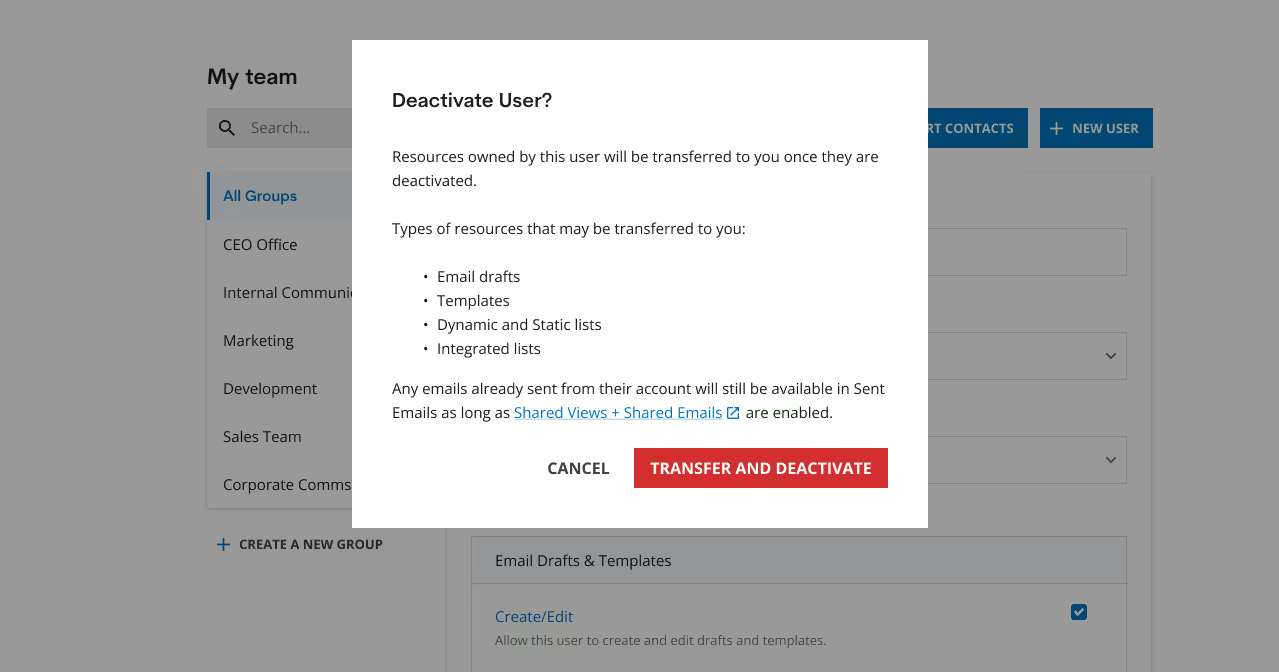
All resources owned by the deactivated user are automatically transferred to the Admin performing the deactivation.
Deactivating a user:
Admin user understands what type of resources would potentially by transferred over to them.
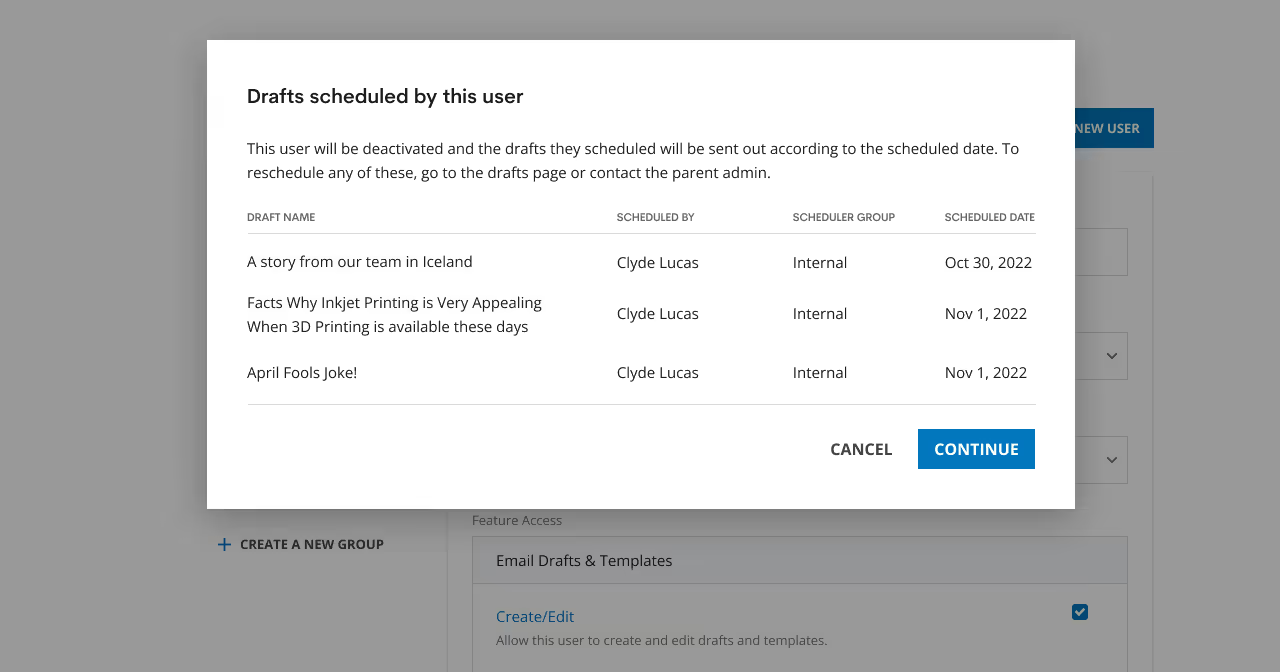
Scheduled drafts for deactivated users:
Email drafts scheduled by the deactivated user will be sent as planned, giving the Admin user a clear sense of all scheduled drafts. In most instances, there is no need to reschedule these drafts, this primarily serves as an informative overview.
The implementation of the resource transfer process significantly enhanced the user deactivation workflow. Following the feature's release into production, there was a notable decrease in support requests related to user deactivations and the recreation of email drafts and templates.
While the current solution adds tremendous value to the user management system, further enhancements are possible but were not captured due to the tight 2 month deadline from idea to production.
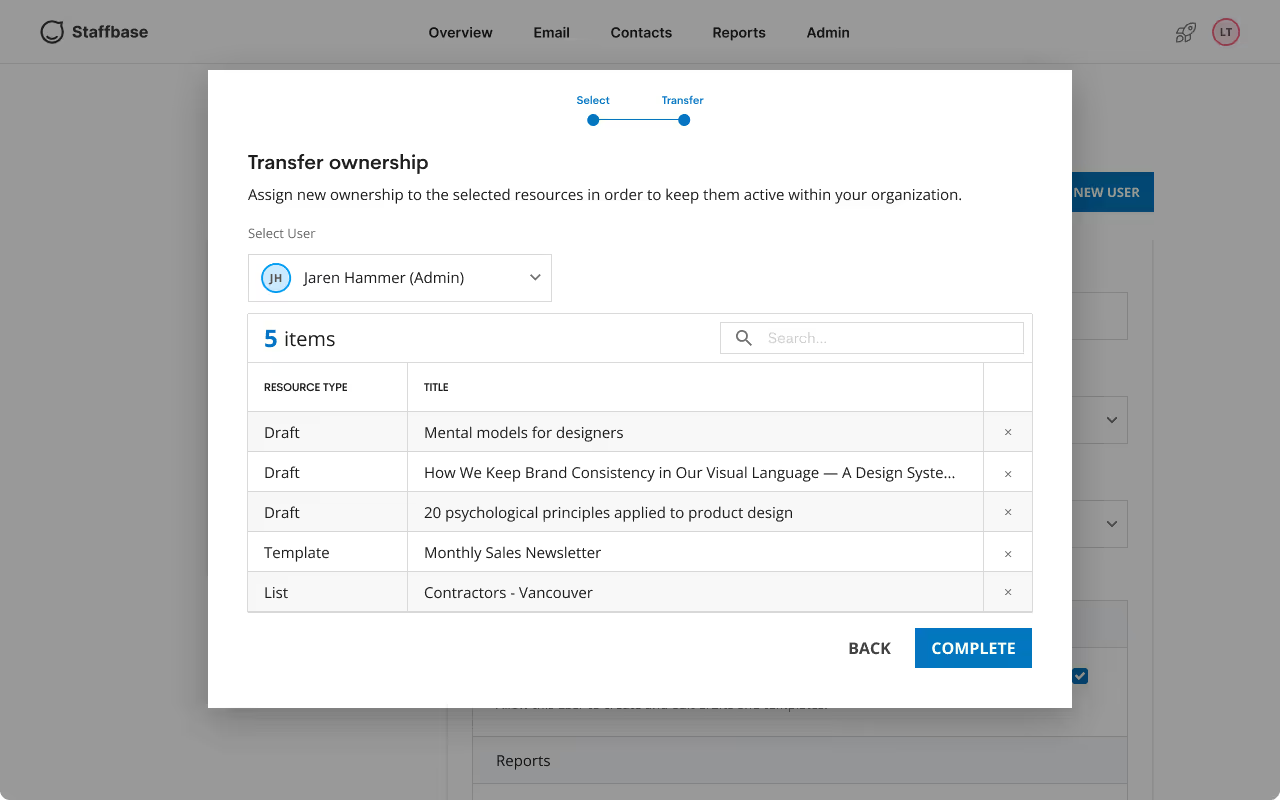
For example, enabling admins to select specific resources for transfer or implementing bulk actions could further streamline the process and boost user autonomy. These ideas are illustrated in mockups, laying the groundwork for continuous improvement of the feature at a later date.
Selecting resources:
Categorized by types, Admins can select which resources to keep or deactivated along with the user.

Selecting an owner:
Instead of defaulting ownership to the Admin performing the deactivation, they can select another Admin user to take ownership.